
Most budgeting apps were designed for individuals and bolted on sharing as an afterthought — if at all. Curl Budget was designed from the ground up for sharing. Here is how they compare for couples:
| Feature | Curl Budget | Monarch | YNAB | Copilot | Honeydue |
|---|---|---|---|---|---|
| Shared access | Yes | Yes | YNAB Together | No | Yes |
| Role permissions | 3 roles | Limited | No | N/A | Limited |
| Activity feed | Yes | No | No | N/A | Limited |
| Annual price (couple) | $50* | $100 | $109-$218 | $120 (1 user) | Free |
| Active development | Yes | Yes | Yes | Yes | Unclear |
What Couples Actually Need From a Budgeting App
Shared visibility
Both partners see the same transactions, budgets, and reports.
Role-based permissions
One partner manages, the other reviews — or both manage equally.
One subscription
Share via Apple Family or Google Play Family Library.
Activity feed
See who categorized, budgeted, or changed anything — and when.
Shared rules
Categories, tags, and auto-rules are workspace-level, not per-user.
Budget alerts
Both partners get notified when spending approaches a limit.
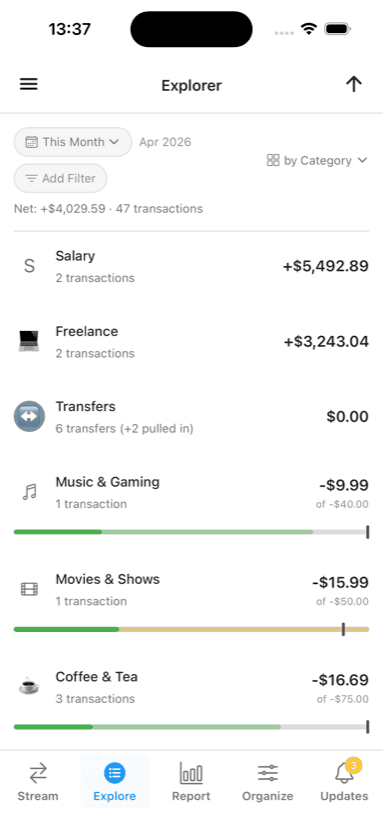
Shared categories
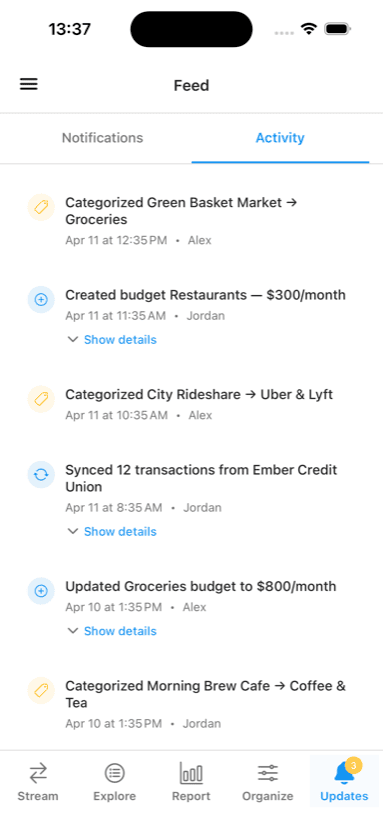
Who changed what
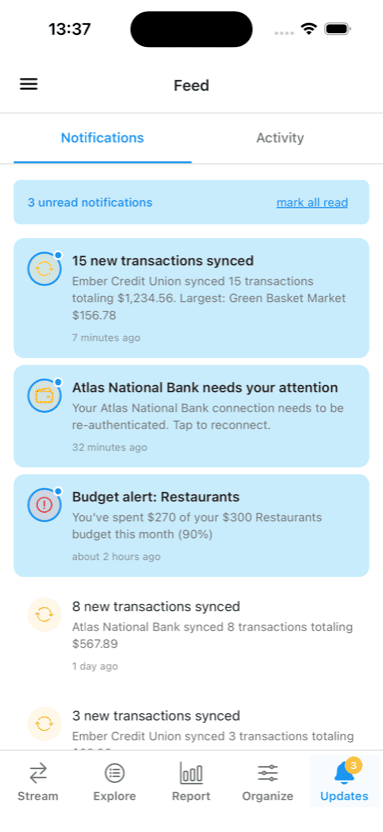
Proactive budget alerts
How the Major Apps Handle Couples
Honeydue
Honeydue was built specifically for couples, which is appealing in theory. In practice, the app has gone quiet. User reports indicate that customer support has stopped responding, features have been removed, and the app has not received meaningful updates. If you are already using it and it works for you, great, but starting fresh on an app with no visible development activity is a risk.
Curl Budget is not free like Honeydue was, but we charge half of what comparable apps do: we believe that an app to save money needs to save you money! This pricing model allows us to support ongoing improvements so that you can depend on Curl Budget today and in the future.
Monarch Money ($100/yr)
Monarch supports shared access and has solid reporting. The catch is price: $100 per year. For a household already watching its spending, doubling the cost of a budgeting subscription is hard to justify when alternatives exist at half the price.
Curl Budget already offers most of the functionality Monarch does (and we are releasing more every week) but at half the price. I also think that Curl's design is a bit more streamlined and intuitive.
YNAB ($109/yr per person)
YNAB is a strong budgeting tool with an engaged community. Sharing a budget, however, requires either two subscriptions ($218/yr total) or using YNAB Together, which is a newer feature with its own limitations. The envelope budgeting method is powerful but has a steep learning curve, which can be a source of friction when one partner is less engaged.
Curl Budget supports both a more laid back approach (just tracking your expenses) as well as full on every-dollar envelope budgeting. So you can start easy and transition to the strict methodology later if you want to.
Copilot ($120/yr)
Copilot has a polished interface and good transaction categorization, but it does not support sharing at all. If you are a couple, one of you can use it and the other cannot see anything. That is a dealbreaker for joint budgeting.
How Curl Budget Handles Couples
Curl Budget was designed from the ground up for sharing with permissioned workspaces. Workspaces are shared financial environments that contain their own accounts, transactions, categories, tags, budgets, and rules. A workspace is not a bolted-on sharing feature. It is the core organizational unit of the app, providing security and flexibility.
Roles That Match Real Relationships
Every workspace member has one of three roles:
| Role | What They Can Do |
|---|---|
| Owner | Full control: manage members, delete the workspace |
| Member | Read and write: connect accounts, manage categories and budgets |
| Viewer | Read-only: see all transactions, reports, and budgets |
This provides flexibility to manage the way you actually operate. If one partner manages the 'boring' details, they are the Owner. The other partner can be a co-Owner, a Member, or even a viewer (if they just want visibility). And each workspace gets its own permissions, so one person can be the owner of one workspace while the other owns another workspace (say a side hustle or freelance workspace.)
Shared Categories, Rules, and Budgets
Categories, tags, auto-rules, and budgets are all workspace-level. When one partner creates a "Dining Out" budget or sets up an auto-rule to categorize Whole Foods transactions as "Groceries," the other partner sees and benefits from that immediately. There is no per-user configuration to keep in sync.
Activity Feed
Every action in a shared workspace is logged:
- Who categorized a transaction
- Who changed a budget amount
- Who connected a new account
- Who joined or left the workspace
This is not surveillance. It is the kind of transparency that prevents the "wait, why does our grocery budget look different?" conversation from turning into a misunderstanding.
Share transactions in text
Copy a link to a transaction and send it directly to your partner so that they can see the same thing you do.
Affordable for Couples
One Curl Budget subscription at $50 per year covers your whole household through Apple Family Sharing or Google Play Family Library. One partner subscribes, the other joins for free. That is half the price of Monarch and less than a quarter of YNAB for two.
*Partner access requires Apple Family Sharing (iOS) or Google Play Family Library (Android).
Real Scenarios
"I Manage, My Partner Checks In"
Jordan manages the household budget. They connect the joint checking account and two credit cards to a shared workspace, set up categories, and create monthly budgets. Their partner Alex is added as a Viewer. Alex can open the app anytime to see spending against budget, review recent transactions, and look at cash flow reports, but cannot accidentally change a category or delete a transaction. If they decide Alex should start helping with categorization, Jordan promotes Alex to Member in one tap.
"We Split Category Ownership"
Jordan and Alex share financial management equally. Both are Owners in their shared workspace. Jordan handles the auto-rules for recurring bills and insurance. Alex manages the grocery and dining budgets. Both can see everything the other does in the activity feed. When Alex recategorizes a transaction Jordan entered, Jordan sees it logged and can ask about it, or just trust the change.
"We share some things but get to do our own thing too."
Some couples have a shared account for shared expenses, but separate "no judgies" personal accounts. Curl Budget can handle this. You can either put the accounts in the same workspace (honor system) or put them in separate workspaces to truly keep things separate.
Try It With Your Partner
Set up a workspace, invite your partner, and see how shared visibility changes your financial conversations.