
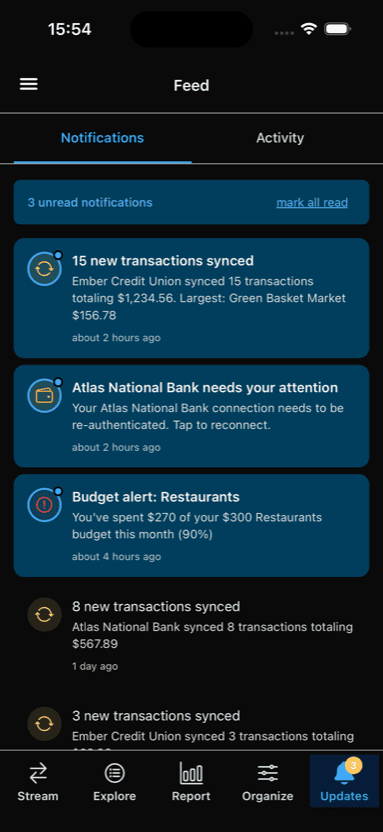
A push notification should tell you something useful. "3 new transactions totaling $127.45 from Amazon, Whole Foods, and Shell" is useful. "You have a new notification" is not. You shouldn't have to open the app just to find out why it pinged you.
But there's a reason so many finance apps send vague notifications. When an app sends a push notification, the content passes through intermediary servers — Apple's Push Notification service on iOS, Firebase Cloud Messaging on Android. Sending your transaction details, budget amounts, or account balances through those services in plain text is something we'd rather avoid.
Most apps pick one: useful notifications with exposed content, or vague notifications that protect privacy. We took the time to do both.
How It Works
Curl Budget encrypts notification content on our server before sending it through push infrastructure. Your device decrypts it on arrival, before the notification is displayed. The push services in between only ever see a generic fallback message.
What APNS / FCM sees
"New transactions"
What you see
"3 new transactions totaling $127.45 — Amazon, Whole Foods, Shell"
"Budget alert"
"Dining Out budget is at 85% ($170 of $200)"
"Account update"
"Chase Checking needs attention — Re-authenticate"
Every notification type has its own vague fallback — intermediaries never see your merchants, amounts, or account names. You glance at your lock screen and immediately know what's going on.
What Happens Behind the Scenes
When a notification arrives on your device, a code extension intercepts it before it's displayed. It decrypts the payload using a key stored on your device and replaces the generic fallback with the real content.
This all happens immediately and automatically.
If decryption ever fails for any reason (reinstalled the app, key rotation timing, etc.), you still see the generic fallback. No crash, no blank notification. You can always open the app to see the full details.
Under the Hood
For the technically curious:
Per-device keys
Your device generates a unique AES-256 encryption key, stored in secure storage and shared with our server.
AES-256-GCM
Each notification uses a unique initialization vector and GCM authentication tag. Content can't be read or tampered with in transit.
Key rotation
A fresh encryption key is generated every time you launch the app, limiting the window if a key were ever compromised.
Graceful degradation
If anything goes wrong with decryption, the generic fallback is shown. The system never crashes or shows broken content.
Why We Did This
This is a small detail. Most people will never think about what happens to their notification content between our server and their phone. But we think it's representative of the kind of care that a personal finance app should have.
A budgeting app should be both useful and secure. At Curl Budget we put in the extra time to give you both. If you like this or other features, please let us know! If you have ideas for how we could make your information even more useful, reach out.
Try Curl Budget Free for 30 Days
Rich, encrypted notifications are just one of the details we sweat so you don't have to.