Removed Transaction Review
Banks and data providers (Plaid, Apple FinanceKit) sometimes remove transactions after they have already been synced to Curl Budget. Pending charges that never finalize, merchant adjustments, bank-side corrections — any of these can cause a transaction to disappear from the upstream feed. Most budgeting apps simply delete the transaction and your audit trail loses the entry. Curl Budget keeps it visible until you decide what to do.
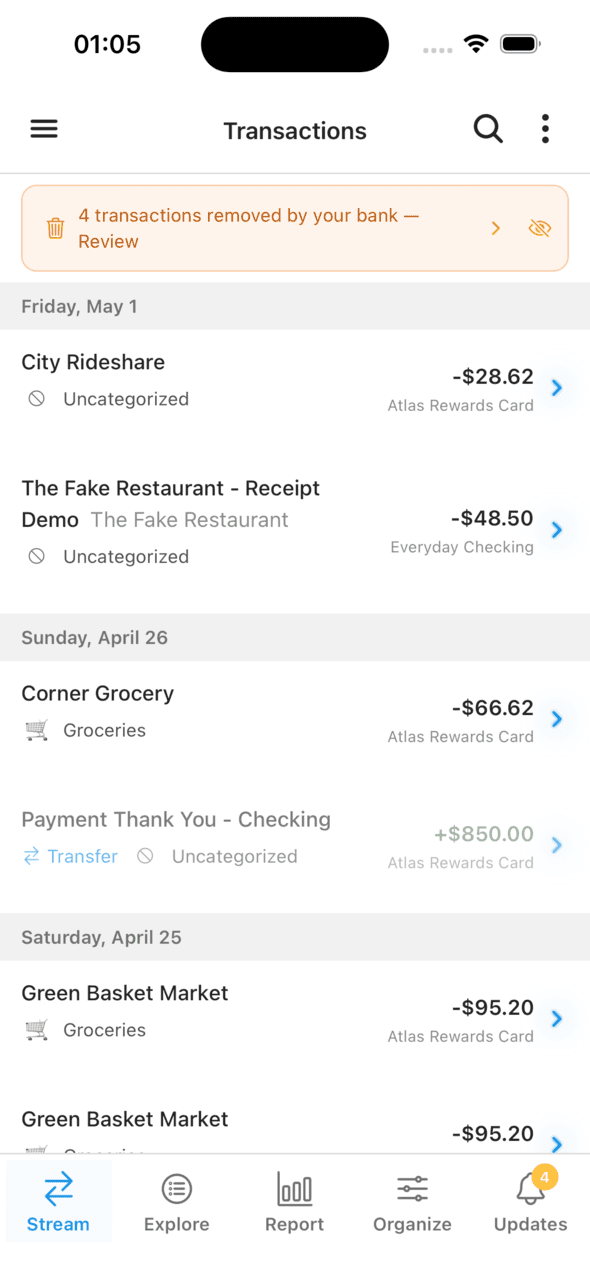
A persistent banner surfaces every removal for review
When This Happens
A transaction may be removed by your provider for several reasons:
- Pending charges that never finalize — gas station pre-authorizations, hotel holds, or canceled orders are common. The bank drops the pending entry and replaces it with the posted (or no) charge.
- Merchant adjustments — a restaurant tip is added after the fact, and the bank treats the original authorization and the final settlement as separate events.
- Bank corrections — banks occasionally fix merchant names, dates, or duplicate postings.
- Provider sync issues — a connection hiccup can briefly remove a transaction that comes back on the next sync.
None of these are unusual. They happen across every connection.
How Curl Budget Handles It
When your provider removes a transaction, Curl Budget marks it as "provider-removed" rather than deleting it. The transaction stays visible in your transaction list with a warning banner:
"Your bank removed this transaction on [date]"
You see two actions:
- Keep — restore the transaction. Useful when the removal looks like a sync glitch, or when you want to preserve the record for reconciliation.
- Remove — confirm the deletion. The transaction is permanently removed from your records.
If a likely posted replacement is found, the badge surfaces it: "Likely posted as: [merchant]" — tap to jump to the replacement transaction. This makes it easy to verify that a removal is benign before confirming. Curl looks for replacements in two situations:
- Pending → posted. A pending charge that was later finalized as a posted transaction. Pending charges and their posted twins often differ a little — the bank rewrites the description, rounds the amount, or shifts the timestamp — so the match here is forgiving: similar description or merchant, similar amount, posted within a week.
- Posted → posted. A posted transaction that was removed and replaced by a separate posted transaction on the same account. This shows up on cards that don't really use the pending state (Apple Card is the common one — charges go "authorized" → "booked", not "pending" → "posted"). Because both rows are posted, the match has to be exact: same calendar date, identical description, identical amount. There's no lifecycle that should rewrite these attributes, so a near-miss is almost certainly a different transaction.
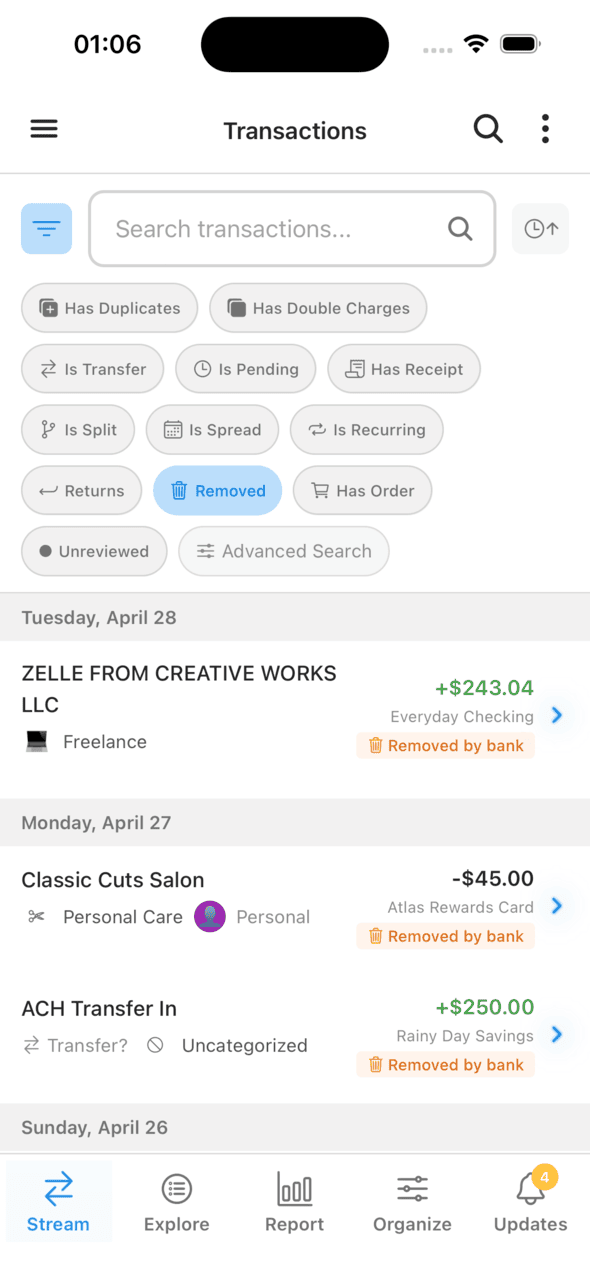
Removed transactions stay visible with their categorization and account intact
Workspace Settings
Two toggles in Workspace Settings → Removed Transactions control how the review surfaces:
- Review Removed Transactions — the master switch. When off, the banner and "removed" filter chip are hidden and detection runs silently. Turn it back on at any time to restore visibility.
- Hide When Posted Equivalent Found — when a removed transaction has a clear posted twin on the same account (using the match rules above), the removed entry is hidden by default — the surviving posted version represents the real transaction. Pending removals less than 3 days old are also hidden briefly while waiting for a possible posted match; posted-removed entries are surfaced immediately because there's no lifecycle to wait on.
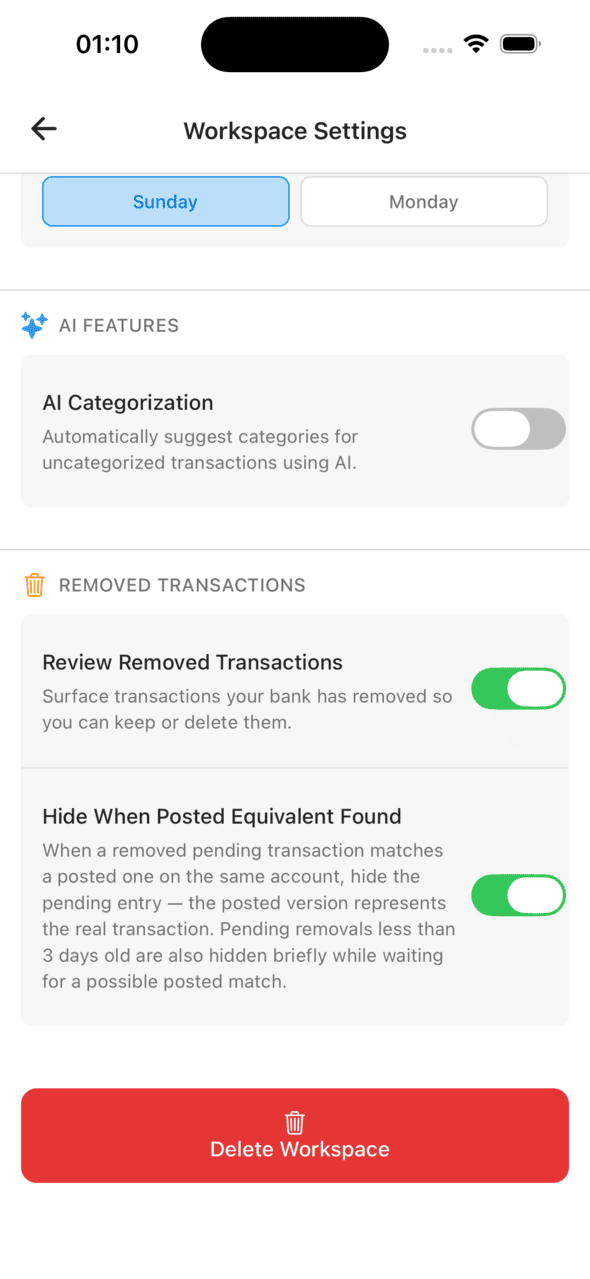
Review behavior is tunable per workspace
Why This Matters
A budget app that silently deletes transactions makes a choice for you about how much you get to know about your own finances. Common cases where the visible review matters:
- Reconciliation. You're checking your budget against your bank statement and the numbers don't match. The removed transaction tells you what changed.
- Dispute tracking. You disputed a charge and want to confirm it was actually removed. Instead of wondering whether it just vanished, you can verify.
- Sync confidence. If a transaction disappears that you remember seeing, you can check whether it was a real provider removal or a connection hiccup.
Filtering for Removed Transactions
The transaction search/filter UI includes a "removed" filter chip. Use it to view all transactions your provider has removed but that you haven't yet acted on, or to audit historical removals.
Related
- When Your Bank Removes a Transaction — feature overview with screenshots.
- Duplicate Detection — handles the opposite case: the same transaction appearing twice.
- Plaid Integration — how Plaid syncs transactions and what triggers a removal.