Push Notifications
Push notifications keep you informed about your finances even when you're not using the app. This guide explains how push notifications work, what types are available, and how to ensure they're working properly.
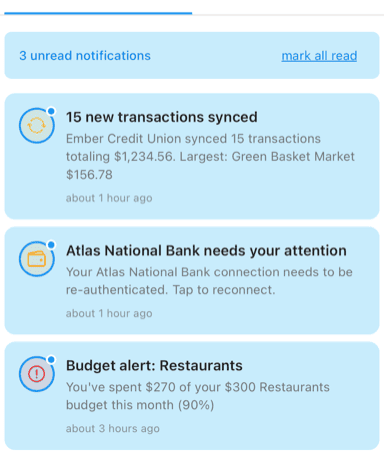
Transaction sync, account alert, and budget warning notifications
How Push Works
The Flow
- Event occurs - New transaction, budget crossed, account issue, etc.
- Server detects - Curl Budget processes the event
- Push sent - Notification sent to Apple/Google push services
- Device receives - Your phone displays the notification
- You tap - Opens Curl Budget to the relevant screen
Real-Time Delivery
Push notifications are delivered in near real-time:
- Most arrive within seconds of the event
- Transaction syncs may batch (based on bank updates)
- Budget alerts trigger immediately when thresholds cross
Background Delivery
Notifications work even when Curl Budget isn't open:
- Your device receives pushes independently
- No need to have the app running
- Works as long as device has connectivity
Notification Categories
Transaction Sync
When new transactions are imported:
Notification shows:
- Number of new transactions
- Total amount
- Top merchant (if multiple transactions)
Example:
"3 new transactions totaling $127.45 - Amazon, Whole Foods, Shell"
Settings options:
- Immediate: Get notified right away
- Daily Digest: One summary per day
- Disabled: No transaction notifications
Account Status
When account connections need attention:
Types:
- Error - Something went wrong
- Expiring - Credentials need refresh soon
- Disconnected - Connection lost
- Restored - Connection fixed
Example:
"Chase Checking needs attention - Re-authentication required"
Action: Tap to reconnect
Budget Alerts
When budget thresholds are crossed:
Types:
- Warning - Approaching limit (e.g., 80%)
- Limit Reached - At 100%
- Over Budget - Exceeded limit
Example:
"Dining Out budget is at 85% ($170 of $200)"
See Budget Alerts for details.
Duplicate Alerts
When potential duplicates are found:
Example:
"Potential duplicate detected - $45.00 at Target"
Action: Tap to review and manage
Double Charge Alerts
When potential double charges are found:
Example:
"Potential double charge - Two $32.50 charges at Restaurant XYZ"
Action: Tap to review
Balance Alerts
When balance thresholds are crossed:
Example:
"Chase Checking balance fell below $500 (Current: $423.50)"
Notification Display
Lock Screen
Notifications appear on your lock screen:
- Shows notification preview
- Tap to open Curl Budget
- Swipe to dismiss
Notification Center
Access past notifications:
- Swipe down from top of screen
- Find Curl Budget notifications
- Tap to open, swipe to clear
In-App Badge
The app icon shows unread count:
- Red badge with number
- Clears when you open relevant section
- Reflects unread in-app notifications
In-App Notification Center
Within Curl Budget:
- Tap the bell icon
- View all notifications
- Mark as read
- See notification history
Multiple Devices
Same Account, Multiple Devices
If you use Curl Budget on multiple devices:
- Each device receives notifications independently
- Same notifications go to all devices
- Clearing on one device doesn't affect others
Device Management
You can manage which devices receive notifications in Settings, though most users want notifications on all their devices.
Ensuring Notifications Work
Device Settings
Notifications require proper device configuration:
iOS:
- Settings → Curl Budget
- Notifications → Allow Notifications
- Customize sounds, badges, banners
Android:
- Settings → Apps → Curl Budget
- Notifications → Enable
- Configure channels as desired
App Settings
Within Curl Budget:
- Settings → Notifications
- Enable the notification types you want
- Choose delivery mode (Immediate/Digest/Disabled)
Troubleshooting
If notifications aren't arriving:
Check device settings:
- Notifications enabled for Curl Budget?
- Not in Do Not Disturb mode?
- Battery optimization disabled for Curl Budget?
Check app settings:
- Notification type enabled?
- Not set to Disabled?
Check connectivity:
- Internet connection working?
- Push services reachable?
Try:
- Force close and reopen the app
- Toggle notifications off and on
- Sign out and back in
- Reinstall the app
Notification Delivery Status
Delivery Tracking
Curl Budget tracks notification delivery:
| Status | Meaning |
|---|---|
| Pending | Notification queued for sending |
| Sent | Sent to push service |
| Delivered | Confirmed received by device |
| Failed | Delivery unsuccessful |
| Skipped | Not sent (settings, duplicate, etc.) |
Why Notifications Might Be Skipped
- You disabled that notification type
- Duplicate of a recently sent notification
- Rate limiting to prevent spam
- Device not registered for push
Privacy and Security
What's in Notifications
Notifications contain limited information:
- General descriptions
- Amounts (can be hidden in settings)
- No full account numbers
- No sensitive personal data
Preview Settings
Control what shows on lock screen:
- Full preview
- Abbreviated preview
- No preview (just "Curl Budget")
Configure in device notification settings.
Encrypted Delivery
Push notification content is encrypted so that intermediary push services (Apple APNs, Google FCM) never see your financial details:
- Each device has a unique AES-256 encryption key
- Notification content is encrypted on our server and decrypted on your device
- Push servers only see a generic fallback message
- You see the full, useful notification after on-device decryption
Best Practices
Enable Important Alerts
At minimum, enable:
- Account status (know when connections break)
- Budget alerts (catch overspending)
- Balance alerts (avoid overdrafts)
Configure Transaction Notifications Thoughtfully
Transaction notifications can be high-volume:
- Consider using Daily Digest instead of Immediate
- Or disable if you check the app regularly
- Enable for specific categories only
Respond to Alerts Promptly
When you receive alerts:
- Account issues → Fix connections before sync gaps grow
- Budget warnings → Adjust spending while there's still room
- Double charges → Investigate while details are fresh
Related Features
- Notification Settings - Configure your preferences
- Balance Alerts - Set up balance thresholds
- Budget Alerts - Budget notification details
- Account Health - Account status notifications