Double Charge Detection
Sometimes merchants accidentally (or fraudulently) charge you twice for the same purchase. Curl Budget monitors your transactions for suspicious duplicate charges and alerts you so you can take action quickly.
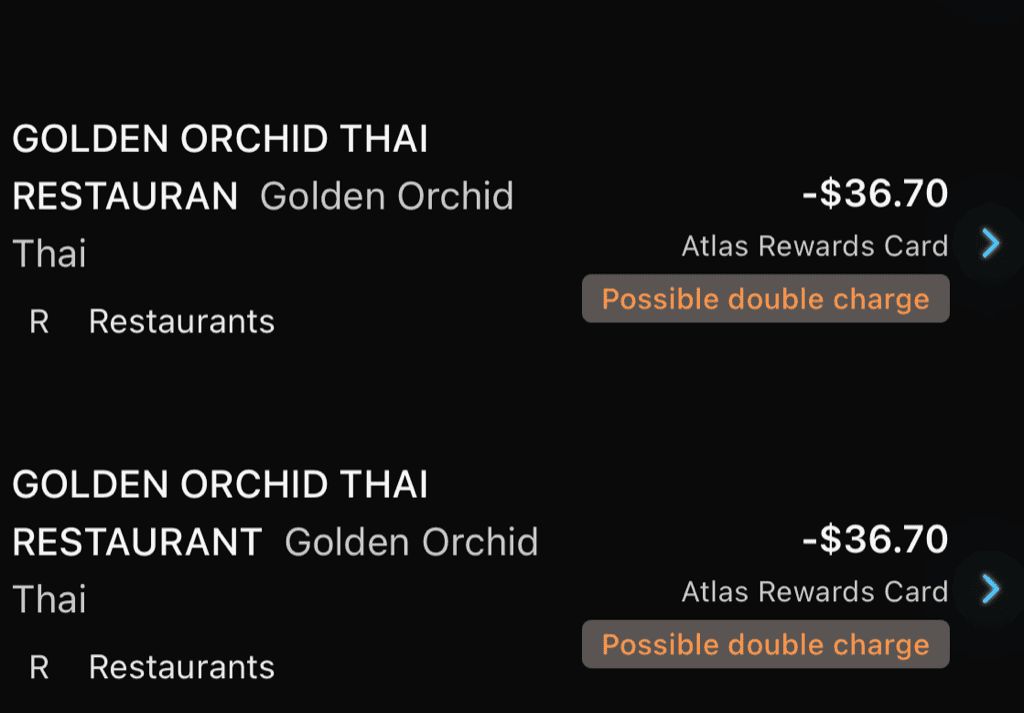
Two charges from the same merchant with nearly identical descriptions flagged as a potential double charge
What Are Double Charges?
Double charges are separate, distinct transactions that shouldn't both exist:
- A restaurant running your card twice by mistake
- A subscription service billing you twice in one day
- A gas station authorization that posts alongside the final charge
- Potential fraud where someone duplicated your charge
Unlike duplicates (where your bank reports the same transaction twice), double charges are actually separate charges that hit your account.
How Detection Works
Curl Budget looks for suspicious patterns that indicate potential double charges:
Matching Criteria
Two transactions are flagged as potential double charges when:
- Same merchant - Both transactions are from the same merchant (identified by Plaid merchant ID)
- Same amount - Exact match, down to the cent
- Within 24 hours - Transactions occurred within a configurable time window (default: 24 hours)
- Similar descriptions - The transaction descriptions are at least 75% similar
Why These Criteria?
- Same merchant + amount catches obvious double-taps
- 24-hour window allows for processing delays while avoiding false positives from regular purchases
- 75% similarity threshold accounts for slight description variations while filtering out unrelated transactions
Viewing Double Charge Alerts
When potential double charges are detected:
Notification Alert
You'll receive a push notification alerting you to the potential issue. Tap to review the flagged transactions.
Transaction View
When viewing a transaction with potential double charges:
- You'll see a "Potential Double Charge" warning
- Tap to see the other transaction(s) flagged
- Compare details to determine if it's legitimate or an error
Managing Double Charge Alerts
After reviewing, you can mark the transactions as:
"Not a Double Charge"
If both transactions are legitimate (you actually made two purchases):
- Open either transaction
- View the double charge alert
- Tap "Not a Double Charge"
- The pair is dismissed and won't be flagged again
This is common for:
- Multiple purchases at the same store on the same day
- Separate items bought at different times
- Tips added after the initial charge
"Exclude All"
If you frequently have legitimate multiple charges from a merchant:
- Open the transaction
- Tap "Exclude All Double Charges"
- All flagged pairs for this transaction are dismissed
Taking Action on Real Double Charges
If you've identified an actual fraudulent or erroneous charge:
- Contact the merchant - Many double charges are merchant errors that can be quickly reversed
- Contact your bank - If the merchant won't help, dispute the charge with your bank
- Keep the alert - Don't dismiss it until the issue is resolved, so you can reference the details
Legitimate vs. Suspicious Charges
Common Legitimate Scenarios
These often trigger alerts but are normal:
- Gas stations - Authorization hold followed by final charge
- Restaurants - Initial charge, then tip adjustment
- Subscriptions - Multiple family members on same account
- Same-day shopping - Multiple trips to the same store
Suspicious Patterns
Watch out for:
- Unfamiliar merchants - Double charges from places you don't recognize
- Exact duplicates - Same amount at the same time
- Inconsistent with your habits - Charges that don't match your spending patterns
Configuration
The detection parameters are optimized for most users, but the underlying settings are:
- Time window: 24 hours (transactions must occur within this window)
- Similarity threshold: 75% (description text similarity)
These defaults balance catching real issues while minimizing false positives.
Double Charges vs. Other Detection
Double Charges vs. Duplicates
| Double Charges | Duplicates |
|---|---|
| Separate charges that hit your account | Same charge reported multiple times |
| Money left your account twice | Money left once, bank reported twice |
| Contact merchant/bank to resolve | Just hide the duplicate in Curl Budget |
| Represents a potential error or fraud | Represents a bank reporting quirk |
Double Charges vs. Transfers
Transfers are intentional movements of money between your accounts. Double charges are unintentional duplicate charges from merchants. These are completely different scenarios.
Notifications
Configure double charge alerts in notification settings:
- Enable/disable double charge notifications
- Immediate or digest delivery options
- Per-device notification preferences
Impact on Reports
Potential double charges still appear in your spending totals until you resolve them. This is intentional because:
- The money actually left your account
- You need accurate data to dispute with your bank
- Only you can determine if a refund is coming
Once resolved (via refund or dismissed as legitimate), your reports reflect reality.
Related Features
- Duplicate Detection - For bank-reported duplicates
- Push Notifications - Get alerted to potential issues
- Notification Settings - Configure your alerts